
Download XP LIVE – Modern Desktop Theme, Free Windows Interface, Windows Live Aesthetic
Overview
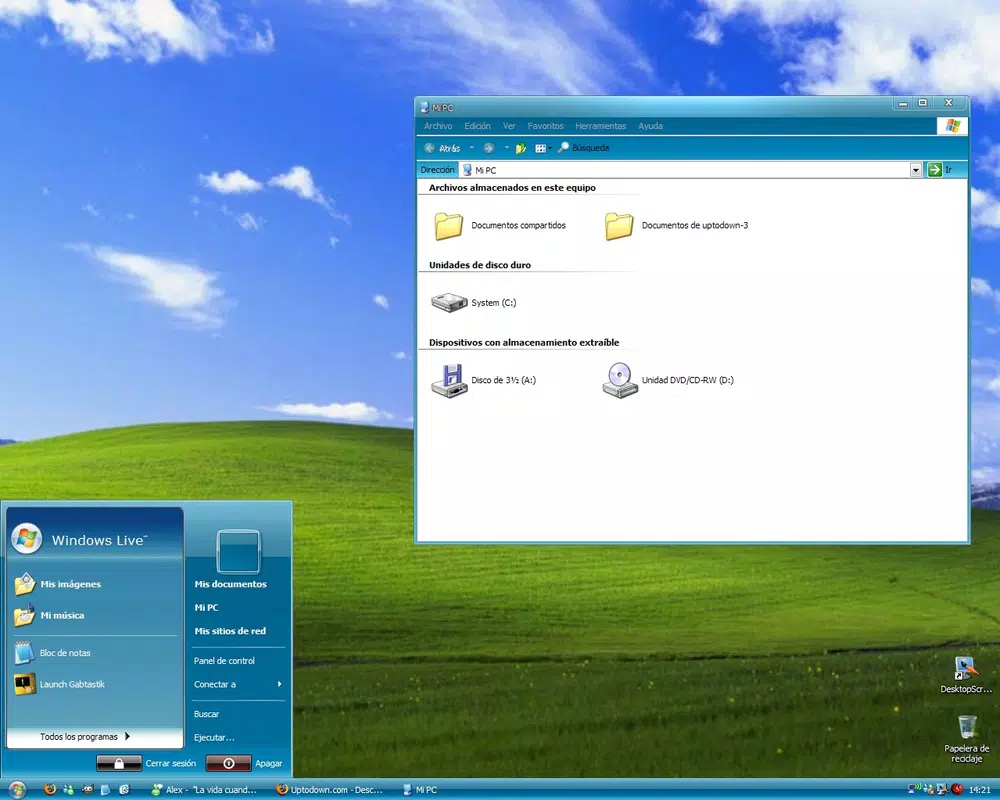
XP LIVE is a desktop theme designed to modernize the Windows user interface by drawing inspiration from the Windows Live services aesthetic. Launched in 2008, the application offers a visually refreshing alternative to the default Windows XP experience, focusing on a sleek, cohesive design language that emphasizes clarity and visual harmony. Its primary purpose is to enhance the desktop environment by introducing a contemporary look that feels familiar to users who previously interacted with Windows Live platforms such as Hotmail, Messenger, and Spaces.
For individuals seeking to personalize their Windows setup without altering core system functionality, XP LIVE presents a lightweight solution that prioritizes visual appeal and usability. The app is particularly suited for users who value aesthetics, nostalgia, and a clean interface. While the developer did not provide additional background details, the theme’s release in 2008 suggests it emerged during a period of significant interface evolution in Microsoft’s ecosystem.
Real-world use cases include personal computers used for daily tasks, creative work, or retro computing setups where users want to blend classic Windows functionality with a modern visual touch. Despite its age, XP LIVE remains relevant in niche communities that appreciate curated desktop themes. Its presence in the broader software ecosystem underscores the enduring demand for customizable user experiences, even within legacy operating systems.
Key Features & Functionality
- Modern Visual Design: XP LIVE reimagines the Windows interface with a clean, contemporary layout inspired by Windows Live services. The theme introduces softer gradients, rounded elements, and a unified color palette that improves visual coherence across the desktop.
- Customized User Interface: Key system components—including windows, taskbars, menus, buttons, and scroll bars—are redesigned to maintain visual consistency. This ensures a seamless experience across all interactions, reducing visual fragmentation.
- Resource Efficient: The theme is engineered to minimize system overhead. Users can enjoy a visually rich interface without compromising performance, making it suitable for older or low-spec machines.
- Easy Installation: The setup process is designed for simplicity, requiring minimal user input. Even non-technical users can apply the theme with confidence, thanks to a streamlined installation wizard.
- Free to Use: XP LIVE is available at no cost, allowing users to access its full visual enhancements without financial commitment. This accessibility supports widespread adoption among hobbyists and desktop enthusiasts.
For example, a user working on a legacy laptop might install XP LIVE to breathe new life into an outdated interface, improving both usability and visual satisfaction. Similarly, a retro computing enthusiast could use the theme to recreate the nostalgic feel of early 2000s Microsoft services while maintaining a polished, modern appearance.
Interface, UX & Performance
The interface of XP LIVE centers around a refined, cohesive visual language that extends across system elements. The theme employs a balanced layout with intuitive spacing, consistent iconography, and a harmonized color scheme that reduces visual clutter. Navigation within the theme is seamless, as it integrates directly with the existing Windows shell without introducing additional layers or complex workflows.
Users can expect smooth transitions and responsive interactions, particularly on systems with moderate to high performance. Although the developer did not list formal performance metrics, the theme’s lightweight architecture suggests stable behavior across various hardware configurations. The absence of heavy animations or background processes contributes to consistent responsiveness during multitasking.
Stability appears to be a strength, as the theme is designed to coexist with core Windows operations. No reports of crashes or conflicts were mentioned in the provided information. However, specific compatibility details were not disclosed, and users are advised to proceed with caution on systems with modified or third-party shell integrations.
Platform Compatibility & Technical Requirements
XP LIVE is designed for the Windows operating system. The application was released on June 30, 2008, and is compatible with Windows XP and potentially earlier or later versions, though the developer did not specify exact OS requirements. The file size is approximately 5.8 MB, indicating a lightweight footprint suitable for older or low-storage devices.
Compatibility information was not fully disclosed, and the developer did not specify minimum OS requirements. As such, users should verify system compatibility before installation. The application is not available for mobile platforms, as it is a desktop theme intended for Windows environments.
Pros and Cons
- Completely free to use with no hidden costs
- Lightweight design with minimal impact on system resources
- Easy-to-use installation process suitable for beginners
- Visually cohesive interface inspired by a well-known Microsoft ecosystem
- Offers a nostalgic yet modern aesthetic for Windows XP users
- Released in 2008; may lack support for newer Windows versions
- No official updates or developer support since release
- Compatibility with modern Windows systems not confirmed
- Does not include advanced customization options beyond visual styling
- Not available on mobile or non-Windows platforms
FAQ
Is XP LIVE safe to download and install?
Yes, the theme is free and designed for Windows XP. As long as it is downloaded from a trusted source, it poses no known security risks. However, users should exercise caution with third-party sites offering the file.
Can I use XP LIVE on Windows 10 or Windows 11?
The developer did not specify compatibility with newer Windows versions. While some users may be able to apply the theme manually, official support is not guaranteed.
Does XP LIVE require administrative privileges?
Installation typically requires user permissions to modify system files. The exact requirements were not listed, but standard Windows user access may be sufficient for basic application.
How do I uninstall XP LIVE if needed?
Users can revert to the default theme through the standard Windows display settings. The uninstall process is straightforward and does not leave residual files in most cases.
Is XP LIVE updated regularly?
No updates have been released since its 2008 launch. The theme remains unchanged and is not actively maintained by the developer.
Final Thoughts
XP LIVE stands as a testament to the enduring appeal of thoughtful desktop customization. While its release date places it in a bygone era of computing, the theme continues to offer value to users seeking a modernized, visually pleasing interface for Windows XP. Its lightweight design, ease of use, and nostalgic aesthetic make it a compelling choice for retro enthusiasts and users who appreciate clean, cohesive visuals.
For those operating older systems or maintaining nostalgic setups, XP LIVE delivers a meaningful upgrade without demanding system resources. Though it lacks modern features and ongoing support, its core strengths—simplicity, affordability, and visual refinement—remain relevant.
Download XP LIVE now


